
 by
Driver Easy Pro 2027 Full Version – Download for Windows

Driver Easy Pro is a Windows driver management application designed to help users identify missing, outdated, and problematic device drivers. It scans your computer and provides information about installed hardware, including the processor, RAM, motherboard, graphics card, network adapter, storage devices, and audio components.
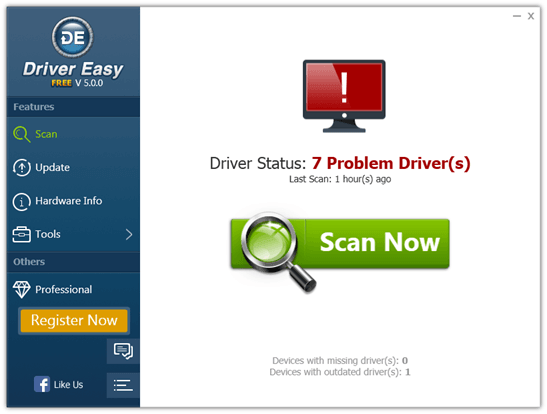
With its simple and user-friendly interface, Driver Easy makes it easier to check your computer’s driver status. After running a system scan, you can review information about outdated drivers, missing drivers, detected devices, and scan results.
What Can Driver Easy Professional Do?
Driver Easy Professional offers several tools for managing and maintaining Windows device drivers. Its scanning feature helps identify drivers that may need attention, while the Downloads section allows you to review available driver updates and their file sizes.
The application also includes hardware information tools and driver backup and restore options. You can open downloaded files, manage hidden devices, and review driver information before deciding which updates to install.
Additional settings allow users to select an interface language, configure proxy connections, and create Windows restore points before making driver changes.
How Does Driver Easy Pro Work?
Driver Easy starts by scanning your computer to identify installed hardware and check its associated drivers. It then displays information about missing, outdated, or potentially problematic drivers.
You can review the scan results and decide which drivers need updating. Before installing any driver, it is recommended to create a backup or Windows restore point. This provides an additional recovery option if an update causes compatibility problems.
Driver Easy is particularly useful for users who want a straightforward way to check their system’s driver status and learn more about their computer hardware.
Driver Easy Pro for Windows 11
Driver Easy is designed to help Windows users maintain their device drivers and troubleshoot certain hardware-related problems. Outdated or incompatible drivers can sometimes cause hardware malfunctions, connectivity issues, display problems, or system instability.
Its straightforward interface makes it accessible to beginners and experienced users. However, always verify driver compatibility and download updates from trusted sources to avoid installing incorrect or unsafe software.
you may also like Adobe Illustrator 2027
Driver Easy Pro Key Features:
- Driver Scanning: Identifies missing, outdated, and potentially problematic device drivers.
- Hardware Information: Displays details about your processor, motherboard, RAM, graphics card, and other components.
- Driver Updates: Helps users find available driver updates.
- Driver Backup: Provides tools for backing up existing device drivers.
- Driver Restore: Helps restore previously backed-up drivers when needed.
- Simple Interface: Features an easy-to-understand interface with clearly organized options.
- Offline Driver Support: Offers options for saving driver information for use on another internet-connected computer.
- Device Management: Allows users to view and manage hidden devices.
- System Restore: Supports creating restore points before installing driver updates.
- Hardware Compatibility: Helps identify hardware components and their associated drivers.
- Download Management: Displays driver download information and file sizes.
- Windows Compatibility: Supports multiple Windows operating system versions, depending on the software release.
System Requirements
| Requirement | Minimum Specification |
|---|---|
| Operating System: | Windows XP, Vista, 7, 8, 8.1, 10, 11 |
| RAM | 256 MB |
| Storage | 20 MB free space |
| Processor | Intel Pentium 4 or later |
| Permissions | Administrator rights |
| Architecture | 32-bit and 64-bit, depending on version |
Note: These are the minimum requirements stated in the supplied software information. Actual requirements may vary by release.
How to Install Driver Easy Pro 7.2.3.6590?
Follow these steps to install Driver Easy safely:
- Download the official Driver Easy installer from its developer’s website.
- Locate the downloaded setup file on your computer.
- If the file is compressed, extract it using a trusted utility such as WinRAR.
- Run the installation file.
- Follow the instructions displayed by the installation wizard.
- Launch Driver Easy after installation.
- Run a system scan to check your installed drivers.
- Review the results and update the drivers you need.
- Create a Windows restore point before making major driver changes.
Important: Avoid unofficial cracks, patches, or modified license files. They may contain malware, compromise your computer, or cause software problems. Use a legitimate license for Professional features.
Final Words
Driver Easy Pro is a useful driver management application for Windows users who want to identify missing or outdated drivers and learn more about their computer hardware. Its scanning, backup, restore, and hardware information features make driver maintenance more convenient.
Password:123



One thought on “Driver Easy Pro Key Full Version Free Download [2027]”